


Messenger : Text Messages
4.1557.00 Reviews
App Specs
- Version
- 5.2
- Updated On
- License
- Free
- Downloads
- 1,000,000+
- Developer
- Messenger : Text Messages
- Categories
- Communication
- Platform
- Android
Screenshots



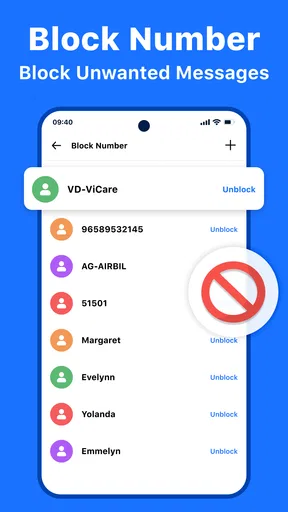
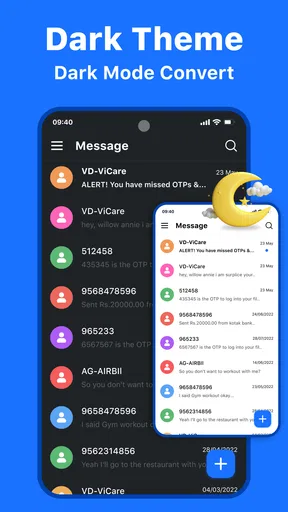
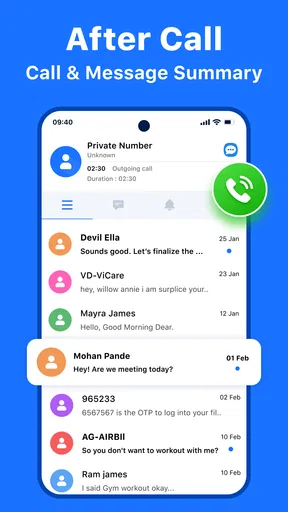
 Analysis by AppCompare
I’d approach Messenger: Text Messages as a straightforward texting app first, rather than a replacement for every kind of online chat. Its appeal is the familiar rhythm of opening a conversation, finding a contact, and sending a message without having to learn a complicated new system. If your main goal is to manage everyday SMS conversations in one place, that focus can be useful; if you expect a full social platform, it may feel limited.
Where it fits in a crowded messaging landscape
Texting apps often compete with services built around internet-based chats, calls, channels, and shared media. This app is better judged by whether it makes ordinary messaging comfortable than by whether it matches every feature in those broader platforms. I’d keep it in mind for practical conversations with people who use different phones or messaging habits, while sticking with a particular chat service when a group already depends on its accounts and extra tools.
That distinction matters before switching. A separate texting app can make the everyday inbox feel more personal, but it does not automatically mean every friend will receive messages through the same system or that every conversation will behave like an internet chat. I’d check how the app handles the conversations I rely on most before making it my default, especially if I regularly communicate across a mix of devices and services.
A useful test before making it your default
I’d try it first with a few low-stakes conversations: a short note to a family member, a quick coordination message, and a group chat that does not depend on specialized features. That gives you a feel for the contact flow, notifications, and how the app fits your routine without putting important conversations at risk. If it feels natural after that small trial, moving more of your day-to-day texting over is a more sensible next step than changing everything at once.
For an everyday example, imagine arranging a lift after work. You can use a brief message to confirm the time, then check the thread later rather than searching through several social feeds. The practical advantage is not a dramatic new communication method; it is having a familiar place for ordinary exchanges. I find that kind of simplicity most valuable when I need to send something quickly and get back to what I was doing.
The app is free to download, though in-app purchases are listed from $3.99 to $29.99 per item. I would treat that as a reason to look carefully at any optional purchase screen rather than assuming every extra is included. For basic texting, the sensible question is whether the free experience meets your needs before paying for personalization or other extras. That keeps the decision grounded in what you actually use, not in features that simply look appealing at first glance.
First Impressions Matter
When I first opened the Messenger: Text Messages app, the clean and straightforward interface immediately caught my eye. It’s got this sleek design that doesn’t overwhelm you with too many options right off the bat. I really appreciate apps that keep it simple, especially when all I want to do is send a quick text.
Worth Reading Before You Choose

EA SPORTS FC Mobile 26 Is a Bigger Football Game, but It Takes Time

Flipboard Shows What News Apps Must Do Beyond the Feed

Switching to Android Auto Means Rethinking Your Driving Routine

Google Calendar Makes a Crowded Week Easier to Manage

Ludo King Makes the Most of the Minutes Between Plans

Baby Panda World Brings Quick Play to Modern Phones, but Its Game Library Feels Busy
Setting Up and Getting Started
Getting set up was a breeze. The app prompted me to sync my contacts, and within seconds, I had all my usual suspects ready to chat. If you’re switching from another messaging app, you’ll be glad to know that this one plays nice with others. No messy transitions here!
One thing I noticed is how fast the messages send and receive. We’re talking instant. I can’t tell you how many times a laggy app has made me double-send a message. But here, everything was smooth sailing.
Features That Stand Out
Now, let’s talk features. This app brings some cool stuff to the table. You’ve got your standard emojis, GIFs, and stickers, of course. But what really won me over was the ability to customize chat themes. I’m a sucker for personalization, and being able to match the chat vibe to my mood is just awesome.
Oh, and did I mention the auto-reply feature? It’s a lifesaver when you're busy but don’t want to leave your friends hanging. You can set it up to send quick responses, which is super handy during meetings or when you’re driving. Safety first, right?
Making the extras useful, not distracting
The custom themes are a nice touch, but I’d use them with a little restraint if I rely on quick visual scanning. Keeping conversations visually distinct can help me find the right thread at a glance; changing every chat into a different look can also make the inbox feel busier. My practical approach would be to personalize only the conversations where the visual cue genuinely helps, then leave the rest familiar.
Auto-replies also work best as a small courtesy, not as a substitute for a real response. I’d keep the wording clear and neutral so a friend or coworker understands that I’m unavailable and should not expect an immediate answer. For anything time-sensitive, a canned response can create the wrong impression, so I would avoid relying on it for urgent arrangements or sensitive conversations.
Everyday habits that make texting smoother
One useful habit is to pause before replying when a conversation has several people in it. A quick glance at the thread name and recent messages can prevent a personal note from going to a group by mistake. That is a simple workflow rather than a special feature, but it matters in any app where a busy inbox makes similar conversations easy to confuse.
I’d also use the app’s offline messaging angle with realistic expectations. It can be appealing when connectivity is unreliable, but offline does not mean a message reaches someone instantly without a working route to them. I would draft or send what I need, then check the thread later when I have a connection rather than assuming a recipient has already seen it. That small distinction avoids confusion when plans depend on a timely reply.
Security and Privacy
In today’s world, privacy is a big deal. I dug into the app’s security settings, and I must say, it didn’t disappoint. End-to-end encryption is a standard feature, which means my chats are for my eyes only. Plus, the app allows you to lock conversations, adding an extra layer of security for those private talks.
Even with those protections, I’d avoid treating a conversation lock as a complete privacy plan. A lock can help if someone casually handles your phone, but it does not replace a strong device passcode or careful notification settings. I’d consider whether message previews show more than I want on a lock screen and adjust my phone’s notification habits accordingly. That is especially worthwhile for shared devices or messages that contain personal details.
Usability and Navigation
Navigating through the app is intuitive. Everything is where you’d expect it to be, and the learning curve is practically nonexistent. If you’ve used any messaging app before, you’ll feel right at home. The developers clearly put a lot of thought into user experience, and it shows.
The app also supports group chats, which are a staple in any messaging app. Creating groups is straightforward, and managing them is even easier. Whether you’re planning a party or organizing a project, this feature will have you covered.
Group conversations without the clutter
For a group that is mainly coordinating simple details—who is bringing what, where to meet, or whether everyone is running late—this setup is enough. I’d give a group a recognizable name and keep the conversation focused on one plan. If the chat turns into a long-running project with files, task assignments, and decisions that people need to find weeks later, I would choose a collaboration tool designed for that job instead of expecting a text thread to become a project archive.
That is one of the app’s clearest trade-offs: a familiar group thread is easy to start, but convenience can produce a stream of messages that is hard to search mentally. For a short-lived event, that is rarely a problem. For an ongoing family or work group, I’d keep important dates and decisions somewhere more durable rather than trusting the chat to serve as the only record.
Who will appreciate it—and who may not
I think it suits people who want a simple home for routine texting, like the option to change the look of conversations, and value small conveniences such as quick replies. It may also appeal to someone who finds larger messaging platforms too busy and wants to spend less time navigating social features. Its Everyone age rating makes it broadly suitable in terms of content classification, though younger users still benefit from ordinary guidance about sharing personal information and managing conversations.
I’d skip it if your household or work circle already depends on a specific internet messenger for voice calls, large media sharing, or a shared set of community features. I’d also be cautious about switching if your current messaging setup is stable and you mainly want guarantees about backups, cross-device continuity, or privacy behavior beyond the protections described in the app. Those needs deserve a direct check before changing a default communication tool.
What its version history can—and cannot—tell you
The app was released on Jul 29, 2022, and its current version is 5.2. That gives me a useful snapshot of where the product stands today, but a version number alone does not reveal exactly which changes arrived along the way. I would not assume a particular feature was recently added or that every earlier user will see the same setup after updating. The practical test is to open the current build and see whether the tools you care about are present and easy to use.
For existing users, a newer version can be a reason to check settings after an update rather than assuming every preference stayed exactly where it was. I’d take a moment to review the theme, auto-reply behavior, and conversation-lock settings I rely on. That is a sensible routine for a communication app: it helps catch an unwanted change in how the inbox looks or responds before it becomes a surprise during a busy day.
Reputation, compatibility, and the decision to try it
It has a 4.2 average from around 11 thousand ratings, with over 1 million installs. I read those figures as a sign that many people have tried it, not as proof that it will suit every phone, carrier, or texting routine. The app is currently at version 5.2 and requires Android 8.0 or later, so I would check that requirement before planning a switch on an older device. It is made by Messenger : Text Messages, and the straightforward focus is what I would evaluate most closely.
My own decision would come down to a few practical checks: can I find the right contact quickly, do messages behave as I expect in the conversations I use every day, and are the optional extras worth anything to me? If those answers are yes, the app earns a place on my phone. If not, returning to the messaging tool that already fits my contacts and habits is a perfectly reasonable choice.
Final Thoughts
To wrap it up, Messenger: Text Messages is a solid choice if you’re looking for an efficient, user-friendly messaging app. It doesn’t try to reinvent the wheel but enhances the experience we’ve all come to expect. The customization options, combined with top-notch security features, make it a standout in the crowded app store landscape.
If you’re on the fence about trying it, I’d say go for it! It’s free to download, so you really have nothing to lose. Whether you’re a casual texter or a messaging maestro, this app has something to offer.
Happy texting!
Pros
- User-friendly interface for easy navigation.
- Seamless integration with contacts and apps.
- Supports multimedia sharing like photos and videos.
- End-to-end encryption for enhanced privacy.
- Customizable themes and chat backgrounds.
Cons
- Requires internet connection for all features.
- Occasional lag in message delivery.
- Limited customization for notifications.
- Ads might be intrusive in free version.
- Consumes significant battery life.
FAQs for Messenger : Text Messages
What features does Messenger: Text Messages offer?
Messenger: Text Messages provides a comprehensive suite of features including instant messaging, voice and video calls, group chats, and multimedia sharing. Users can also enjoy customizable themes, emoji reactions, and end-to-end encryption for enhanced privacy. The app supports seamless integration with other social media platforms, ensuring a connected experience.
Is Messenger: Text Messages secure for personal conversations?
Yes, Messenger: Text Messages emphasizes user privacy and security by offering end-to-end encryption. This means that only you and the person you're communicating with can read or listen to what's sent. Additionally, the app includes features like two-factor authentication to further protect your account from unauthorized access.
Can I use Messenger: Text Messages without an internet connection?
Messenger: Text Messages primarily requires an internet connection to send and receive messages. However, it does support offline messaging, allowing you to draft messages without connectivity. These drafts are automatically sent once the device reconnects to the internet, ensuring uninterrupted communication when network access is restored.
How does Messenger: Text Messages handle data usage?
Messenger: Text Messages is optimized to minimize data usage, making it suitable for users with limited data plans. The app compresses images and videos before sending, reducing the amount of data required. Users can also adjust settings to lower data consumption during calls, making it a versatile choice for varying data conditions.
Is Messenger: Text Messages available on multiple devices?
Yes, Messenger: Text Messages is available on both Android and iOS devices. It also supports cross-device synchronization, allowing you to access your messages and calls on tablets and desktop computers. This feature ensures you never miss a conversation, regardless of which device you're using at the moment.


